Showing posts with label opensuse. Show all posts

2008-07-12

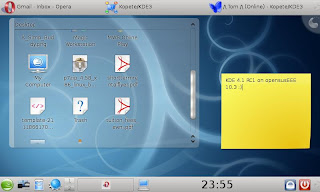
KDE 4.1 Beta 1 on opensusEEE

So, when i moved to Rotterdam the only computer i brought was my EEE. And since holland is rated 3rd internationally for internet penetration ( combo of speed and usage ), i thought, let me actually do what south african internet speeds held me back from. So i installed the latest KDE 4 beta. Using openSUSE 10.3, the one click install process subscribes you to the repository and gives u the latest packages. After those had dl'd and installed ( about 20 minutes on my 6mb/s cable connection ) I reopened YaST software tool and made sure i had all the packages i wanted. I installed some openSUSE branding, just to make it look polished. But i was in for a surprise. The last time I used KDE 4, it was ok. It crashed randomly and clearly was still  a work in process, but the potential was certainly there. I can see KDE 4 for what its worth. A great advancement in desktop technology. The plasma concept is amazing, and I love the idea of getting rid of "the desktop as an icon ghetto" ( in the words of Aaron Seigo - brilliant quote btw ). This was where I entered KDE 4.1 Beta 1. Wow was my first impression. The polished openSUSE branded loading screen is really pretty, so I'm glad I took the time to install the extra stuff :P

Now down to what's important. KDE 4.1 is clearly becoming a very polished desktop! Folderview rocks, and once the desktop alpha thing is fixed ( not sure what else to call it ). The idea of that is so kewl, its much better that a standard icon desktop, since you can do so much more. If you really want an icon wasteland, u can have one, but i like order on my desktop ( sadly my wife is using the laptop for work until we get a pc, so she dumps everything on the desktop ). The desktop zoom out, add activity is kewl. It doesnt really appeal to me, purely cause i'm not a multidesktop person, but if i was i can see why it'd use it. Kopete still doesnt seem ready ( crashed after a few mins ), but Kopete for KDE3 still works great :) That aside, I can see where kopete for kde 4 is going and I like it. Its gonna be very difficult for me to choose between digsby and kopete. Maybe i should write another post about digsby, a really kewl im client with a lot of features ( making it far more than an im client ). Dolphin has been amazing since it was first put into KDE 4, so I dont need to say much more than if you are to replace konqueror as a file manager, dolphin is the only replacement i could accept. Since I mostly use the net and web apps ( and the EEE is pretty much made for that :P ), opera runs great on KDE 4 ( as expected ), which takes care of most of my needs.  So after a few minutes playing around, I realised I was missing YaKuake. For anyone who uses the terminal a lot, maybe a programmer like myself, YaKuake is one of my killer apps. Its a Quake style drop down console. One button ( which I normally make ~ for nostalga sake ), and u have a term, which hides away with none of this alt+tabbing stuff :P With openSUSE one-click install, again it was done quickly, and all there :) Again, great job done to the KDE guys!!! The only things which i miss greatly are autohide panels ( since im on the EEE, 800x480 res and need all the screen space i can get ) and mac style menu bar at the top the of the screen, something I got used to before moving to Holland. Now for the screen shot spam.
2008-05-18

Ubuntu and the Temple of Doom

Honestly, why has Ubuntu become the love of the linux community? What I see is a nicely polished distro with virtually no consistent admin tools and a lot of hype. Yes you can configure your desktop, but try set up an ip route with 2 internal network cards without using a single line in the console. I can in SUSE, I can in mandriva. In fact YaST and Mandriva Control Center make having linux on your pc user friendly. The biggest complaint still about linux is you need to be a developer. My arguement against that is that with a good distro, you dont. Fine, I am a software developer. But being able to change all your system settings with a single graphical tool like YaST or MCC makes life for anyone easier.

What is good about Ubuntu?

  • NOT ease of use: In my opinion that is related to Gnome and ubuntu cannot take any credit for it. I am a KDE user, which in my opinion is easier, and Kubuntu is a very second rate usage of KDE. No wonder the kde live cd's are openSUSE based. Ok fine, it has some stuff like pick up my commercial hardware and the binary drivers now, or install codec support. Try this: http://opensuse-community.org/Multimedia and note the little one click installs for both KDE and Gnome! And this http://en.opensuse.org/Hardware will give you links to hardware items and can list some one click installs for drivers that are obscure. In fact getting a new Logitech webcam to work was so easy, I just went there, did the one click install, and plugged in. Thats it.
  • NOT software instalation: Maybe in days before zypper and yast meta package support, was apt-get more amazing than the rpm based distro's, but not anymore. It has long been on par, and now with Novell's one click install, that makes life so easy! software.opensuse.org/search containts most of what anyone needs, with latest version too. Just browse and click. Why would you want to open synaptic package manager or pull up a terminal and type sudo apt-get?
  • NOT prettiness: Fine, the unique brown branding is as good as brown can look. But most of the prettiness is related to the desktop manager Gnome, which is available on every distro. What's more, its easier to have multiple desktop managers on other distro's, and you can even install all of ubuntu's brown branding if you really needed that brown 80s look.
  • NOT release cycle: Yes they're conistent, but so are other distros.
  • Marketing: This is where ubuntu succeeds. They lambast Novell and, their new best friends, Linspire for a Microsoft deal, purely to try and poach users and developers. Nice marketing! They call it Linux for Human Beings. Well call me an alien. Human beings are obviously far more soficsticated and terminal savvy than Chamelions or Penguins huh??
  • Community: This is something I actually like about ubuntu. Half of the once off obscure issues I run into while trying to do something I should be doing are listed on ubuntu forums. The amount of problems I have solved because of this is pretty amazing. But if Ubuntu wasn't there, there would be another community like it, so I guess that this is not really a valid point?

Well at least thats my take on Ubuntu. I dont like it. Its good for linux as a whole, purely due to its popularity and good marketing, but i think Novell and Mandriva have much better products. Ubuntu feels to me to be more like a toy that the coders are playing with at the moment, which keeps linux cool for developers. That is what i feel is holding linux back, people who don't want it to be cool, and would prefer it to stay in the realm of geeks. You can reply as angrily as you want to this, since it seems a lot of ubuntu users do, but I'd rather look into things like incorporating Wine into a linux kernel module, than putting ubuntu on every desktop. Novell are doing so much to get drivers written for linux, and its working! This is what I care about. Moonlight 2.0 was released recently, and wow, its fantastic. Although it came to be out of a deal with Microsoft, it has brought better Silverlight and .net support for linux than native flash has ever done for flash support. If the developers want something to jump onto, get a top IDE ported, or fix up monodevelop ( the number of times 1.0 crashed on me while just trying to make a GUI, GRRRR ) or make code blocks ( What an IDE!!! ) some cross language support, that would be of greater benefit to coders than having a new toy OS.

2008-03-25

openSUSEEE - Getting openSUSE on the Asus EEE pc

So I got my Asus EEE. I have been wanting one since the announcement. Being someone who is about to travel, and a linux user, I wanted something extermely portable. So I bought it. It cost me R3200, roughly $400, for a 4G Surf, google it for the spec.

So, after using the official Xandros for a day or so, and getting annoyed with the lack of features and, being a programmer by profession, the lack of decent software repositories, I decided to hack it a little. First enabling full desktop mode helped. But still this didn't solve most of my issues. Being an openSUSE user I opted for that. Although it is a bit heavy, it still works nicely, without slowing the pc down. This is how I did it, very simple indeed:

  1. Borrowed a USB DVD-Rom from our system admin at work.
  2. Put the dvd in, and configured bios to make sure the boot order was set up properly. To do this, hit F2 as the machine has just turned on. Go to the boot tab, and change the Boot Device Priority to allow you're dvd rom to be the first in the list.
  3. Boot up the install system. Go through all the usual steps to get it going, until you hit the partition setup step. When asked, you need to create a custom partition setup. Create a 3GB partition, mounted at / and a ~700mb partition mounted at /home which should give you just enough space. If you have something like a SD card, rather use your internal drive all for / and the sd card for the /home partition. Another thing, apparently, is to edit the fstab options to enable the noatime switch. This helps extend the life of the internal solid state drive. I am not sure how important it is really, but I did it anyway. When done it might warn you about not having a swap partition, just ignore it by clicking no. The reason for this is the same as the reason for the noatime flag, extending the life of the drive.
  4. Change the package selection to get rid of some uneeded stuff. I am a coder who browses the net a lot, so for me OpenOffice and KOffice are not important and would be happy to use google docs, so those were unmarked in my install list.
  5. Go ahead and install. This is the longest step.
  6. All the rest of the setup is standard, when you are done, just boot the system, and there you have openSUSE 10.3 on your asus eee.
  7. Once in, to get wireless lan, lan, and some power management stuffs working, download:

Alsa Drivers

ACPI Drivers

On Board Lan Drivers

Wireless Lan Driver

Download these on another pc with net connection, and then use a flash or something to transfer across to you EEE. Install them in any order, reboot, and all should work as expected!

Thats all that is needed to get openSUSE 10.3 onto an Asus EEE pc. Enabling the compiz fusion desktop effects was simple, open a command line and type:

sudo gnome-xgl-switch --enable
Type in the root password, reboot, and compiz and the 3D desktop effects will be active. I wasn't happy with performance when this was on, so i disabled it using:
 sudo gnome-xgl-switch --disable
Again typing in the root password and rebooting. Strictly the reboot isn't needed, but getting it to work without can be a little complicated.

All done!!